MiniMax H3 Hardware Guide: VRAM, Local Workflows and Limits
Check MiniMax H3 VRAM claims against the actual workflow: local Base weights, ComfyUI setup, quantization, and the hosted stages of full 2K generation.
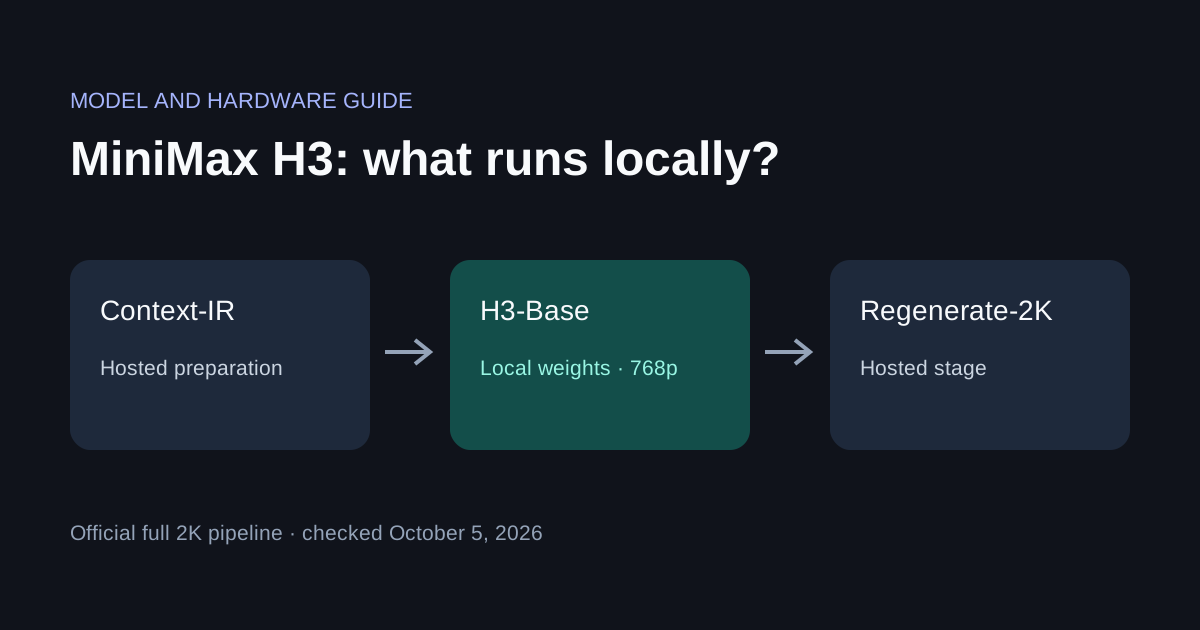
MiniMax H3 can run its Base model locally, but the complete official 2K pipeline also uses hosted stages. A statement such as “H3 runs on 24 GB” is incomplete without a checkpoint, precision, runtime, resolution and finished generation to support it.
This guide was checked on October 5, 2026. We have not run an H3 hardware benchmark, and Local AI Video's current application catalog does not include H3. Use the official workflow links below for H3; our LTX-2.5 guide covers the video model configured in the app.
What runs locally?
The MiniMax repository distinguishes three components:
| Component | Role | Deployment boundary |
|---|---|---|
| H3-Context-IR | Prepares multimodal instructions | Official workflow uses a hosted service |
| H3-Base | Generates 768p video and audio | Released local weights |
| H3-Regenerate-2K | Re-generates the Base output at 2K | Official workflow uses a hosted service |
The Base release offers FL2VA for text or first/last-frame input and Ref2VA for multimodal references. Choose the task before downloading. A full repository download can contain components for workflows you will never use.
A local ComfyUI interface does not itself establish that every node runs offline. Trace the workflow: look for remote API calls, media-upload steps, URLs in inputs and optional post-processing. For a private offline job, store references locally and confirm every necessary stage has local files before disconnecting.
How much VRAM does H3 need?
We cannot substantiate a single minimum for every H3 workflow. The original model combines a large video generator, a large encoder and separate audio/video decoding components. Depending on the backend, these can remain resident together or be loaded in stages. Memory for long clips and reference inputs comes on top of the weights.
The repository's SGLang example uses four GPUs; that is an example configuration, not proof that four GPUs are mandatory. Conversely, it does not validate a consumer single-GPU setup. Source: official deployment example.
Use these buying criteria rather than an unsupported minimum:
| Hardware you have | What to verify before committing |
|---|---|
| 8–12 GB GPU | A completed run with the exact quantization, offload settings and output you need; do not buy based only on file size |
| 16–24 GB GPU | Peak allocated VRAM, system RAM and generation time for the same checkpoint and task |
| Higher-memory or multi-GPU workstation | Runtime support for splitting components and the per-device peak, not just combined memory |
| Apple Silicon Mac | A demonstrated compatible backend; unified memory alone does not establish CUDA workflow compatibility |
These are verification categories, not tested compatibility claims. Quantized model size, free disk space, system RAM and dedicated VRAM are different quantities. If someone reports “20 GB”, first ask which one they measured.
Start with the native ComfyUI workflow
The ComfyUI H3 documentation supplies native templates and explains which versions support each feature. Begin with a basic text-to-video template before adding multimodal references or accelerated variants.
- Update ComfyUI to the version required by the selected template. Check startup logs if core nodes fail to load.
- Open the template library, choose the MiniMax H3 task and follow its model download list. Keep the workflow with those exact filenames.
- Leave the template's model, precision and sampling choices together for the first run. Matching an unfamiliar LoRA to a different checkpoint can create shape errors or partial loading.
- Start with a short clip and one simple action. Save the workflow, seed and full settings with the MP4.
- Check both the picture and the audio before increasing length or resolution. A successfully written silent or incomplete file is not a successful audio-video test.
Use a prompt you can judge clearly, for example: A fixed camera watches a red ceramic cup on a wooden table. Steam rises slowly. Quiet room tone, no speech, no music. This is a proposed test input, not an output we generated.
Measure an entire generation
Record the device and driver, backend version, model repository revision, precision, resolution, frame count, reference count and seed. Record loading time separately from sampling and decoding when available, but also retain end-to-end time. Repeat after the first run so compilation and cache effects remain visible.
| Result to record | Why it matters |
|---|---|
| Per-device peak VRAM and system RAM | Offloading can move the bottleneck instead of removing it |
| Completed output dimensions, duration and audio track | Confirms the requested workload actually finished |
| First-run and repeat duration | Avoids mixing setup overhead with normal generation |
| Error and last completed stage | Distinguishes loading, sampling and decoder memory failures |
Our H3 test status: no local GPU, Mac or multi-GPU result is claimed here. For publisher-provided inputs and outputs, open the repository's reproducible 768p cases. They demonstrate the official workflow, not Local AI Video performance.
Troubleshooting and the next decision
- Missing nodes: match ComfyUI and workflow versions before replacing the model.
- Shape mismatch: check task family, pruning/quantization variant and LoRA compatibility.
- Out of memory while decoding: reduce workload using the backend's supported settings; a model loading successfully does not mean the decoder fits.
- Unexpected network traffic: inspect hosted processing and remote references instead of assuming the GUI is fully local.
- Disappointing quality after acceleration: compare against the unmodified template using the same input before changing several settings at once.
Check the model license before using outputs in a commercial project. If your immediate goal is desktop video generation in our application, compare the measured Mac example and Windows caveats in Run LTX-2.5 locally. For a wider choice, see open-weight video models.
More Posts

Image to Video AI on Your Own Computer: A Step-by-Step Guide
How to turn a photo or picture into a short video with sound using image to video AI that runs locally on a Mac or Windows PC. Setup, prompts, settings and fixes.


How to Make Short AI Videos with Sound, Offline on Your Own Computer
A step-by-step guide to generating short AI video clips with matching audio locally: hardware needs, render times, and how to write prompts for motion, camera and sound.

Open Source AI Video Generators in 2026: What Runs on a Normal Computer
A practical look at open source AI video generators you can download in 2026, including LTX-2, Wan and HunyuanVideo, and what it takes to run them on a Mac or Windows PC.
Newsletter
Join the community
Subscribe to our newsletter for the latest news and updates